
SSAT Accommodations

%205.webp)
Providing students with disabilities equitable access to the SSAT.
Accommodations are available for individuals with disabilities and for religious need.
%202.webp)

Family Responsibility Statement
Families are responsible for providing all equipment, materials, and personnel necessary to support a student’s approved accommodations on test day.
This policy seeks to minimize stress for the student and allows them to work with individuals and equipment with which they are comfortable. If you have concerns about providing approved equipment, materials or personnel, please contact E3n immediately and well before your test date at ta@enrollment.org.
Understanding SSAT Accommodations
- Your student’s testing accommodations MUST be approved BEFORE registering for an SSAT.
- The Process is:
- 1st: Apply and submit documentation
- 2nd: Your approver confirms your request and proves their identity.
- 3rd: Your request is reviewed (You may be contacted for follow-up if necessary).
- 4th: Your request is approved. You may now register.
- Approved accommodations are valid for the current testing year plus one more (testing years are 8/3 to 7/20).
- Allow up to two weeks for E3n's accommodation team to review and process your student’s request for testing accommodations after all required items are completed.
- Once approved, it is best to register as soon as possible as accommodations seats may be limited.
- When registering, you MUST indicate your student requires accommodations or you will register for a test without accommodations.
- SSAT score reports do not 'flag' or indicate that a test was taken with accommodations.
- Testing accommodations are changes to the regular testing environment and auxiliary aids and services that allow individuals with disabilities to demonstrate their true aptitude or achievement level.
- The provision of testing accommodations is not intended to reduce learning expectations.
Any student identified with or suspected of having any disabling condition(s) or impairment(s) that substantially limits their ability to perform a major life activity. Major life activities include, but are not limited to: seeing, hearing, speaking, reading, concentrating, thinking, communicating, and learning.
- If you are unsure of your student’s educational testing needs, we recommend contacting professionals from your student’s current school to discuss appropriate testing accommodations.
- Additionally, it may also be beneficial to contact any medical professionals involved in your student’s care or treatment.
- Lastly, you may choose to contact E3n directly at ta@enrollment.org for consultation regarding the appropriateness of particular testing accommodations for your student.
- Contact us with questions or concerns at ta@enrollment.org! Our dedicated accommodtions staff are focused on answering questions, decreasing stress, and ensuring you know your options and the process.
- Be in touch with your approver. It is the family's responsibility to ensure the approver completes their steps.
- Letting them know to expect an email about accommodations helps discover an email stuck in a spam folder.
- You can check our the approver's actions in your account to see if the approver has completed both steps.
- Have a conversation with your student about what to expect on test day. This goes a long way to a positive test day experience.
- It is always best to submit a full copy of any IEP, 504, evaluation, or other documentation so we can best understand your student's needs.
- Contact your school, school district, or medical professional to obtain the most up to date documentation.
- If you do not have supporting documentation for your student, contact your current school, school district, or medical provider.

Applying and Registering for Accommodations
- Allow up to two weeks for accommodations staff to review and process your student's request for testing accommodations from the date E3n has received all required items.
- This process begins after your student's application, the student's supporting documentation, the approver's online approval form, and the approver identification form are completed.
- Often, applications are approved much more quickly.
- Some applications may take longer if documentation is missing or incomplete, does not meet documentation guidelines, if the approver has not completed all actions necessary, or there are other complicating factors.
First, you must apply for accommodations.
1. Log in to your student’s account, click the “SSAT Testing” button and then the “Apply for / View My Accommodations” tab.
2. Next, click the “Click to Apply for Testing Accommodations” button to be taken to the online application. There you will indicate your student’s disability, select the needed accommodations, and other related information.
3. Provide contact information for an approver who is able to attest that:
- The disabilities indicated and testing accommodations requested are reasonable and valid for your student
4. Upload documentation.
- You can choose to upload documentation later, however, your request will not be reviewed by staff untill all items are completed including documentation upload.
Then, your approver submits their online approval and approver ID form. After submitting your application, the approver will receive an email with a link to complete the secure online approval form for your student's accommodations. This will allow your student’s approver to:
1. Confirm/deny each requested accommodation.
2. Confirm that documentation meeting our requirements is on file.
- You will be notified by automated email when the approver completes their online approval of accommodations and again when the approver has their identification form approved by E3n.
- If your student's application requires the submission of supporting documentation for E3n review, both of these approver requirements must be met before E3n will process or review the application for approval or permit registration for accommodated testing.
- Both portions of the approval MUST be completed by the approver before it will be processed or reviewed.
- The approver's approved ID will be the email address that has been used to complete this process. There is not an assigned ID number for approvers.
Next, E3n reviews your application.
E3n will review the information provided by your approver and the documentation you submitted. After a final decision is made, you will be notified that either:
- Your documentation is acceptable and supports all requested accommodations, or
- Your documentation is acceptable for some of the requested accommodations, or
- Your documentation is not acceptable for any of the requested accommodations.
If your documentation is not acceptable for one or more accommodations, staff will continue to work with you to explain what is necessary and how to move forward to get approval.
Now, you may register for the SSAT!
- When you register for testing, you MUST indicate that your student requires testing accommodations.
- This is one of the first steps of the registration process.
- When you complete your registration, your student’s approved testing accommodations will be linked to your student’s test registration.
- You register and schedule paper testing all in one step in your account.
- Not all paper testing locations provide accommodated testing.
- You must click "Yes" when asked if accommodations are required at the start of registration. This filters available paper tests to those that can support accommodated testing.
- Once registration is completed it may or may not be possible to add additional accommodations.
- Contact ta@enrollment.org with any questions or concerns.
Flex Registration Deadlines
Open Flex
- Registration for tests with accommodations that are open to the public ends 10 days before the test date.
Closed Flex
- Registration for testing with accommodations ends the day of testing.
- While these often last-minute tests offer great flexibility, It is important to note that if specialized materials must be provided for testing (ex. large print test books), additional time is required. Contact your test center or ta@enrollment.org for more information.
Standard Registration Deadlines
- Registration for testing with accommodations ends 14 days before testing.
- You register in your account, but then need to schedule your Prometric test.
- Scheduling can be done from the link in your account after registering OR you can call Prometric at 800-967-1139.
- Many families find calling may be easier to schedule.
- Not all Prometric locations provide all accomomodations.
- Availability closes 24 hours ahead of testing, though often last-minute scheduling is already full.
- Availability for testing that requires a separate room may be limited.
- Once scheduling is completed, your test becomes locked.
- It is generally not possible to add additional accommodations to a scheduled Prometric test.
- Contact ta@enrollment.org with any questions or concerns.
- Assistive Personnel
- Any test with a reader, scribe, or other assistive personnel requires further actions by the family and/or assiitive personnel. If these actions are note taken, the assistive personnel may not be admiitted on test day.
- For these tests we highly recommending calling to schedule to ensure you are clear on the required actions.
- You register in your account and schedule your SSAT at Home test at the same time
- Availability for accommodated testing may be limited.
- Availability closes 72 hours ahead of testing, though often last-minute scheduling is already full.
- Once registration is completed it may or may not be possible to add additional accommodations.
- Contact ta@enrollment.org with any questions or concerns.
Documentation Requirements
IEP/504/Private School Plan
This documentation must reflect a student who routinely receives specific accommodations due to a diagnosed or suspected disability and/or impairment.
Requirements:
- Must be dated within the last 3 years.
- Must be on file with your student’s current school.
- Provides details about the student’s functional limitation(s) resulting from a diagnosed or suspected disability and/or impairment with the need for specific accommodations to be provided.
- Lists all the accommodations provided to the student in the school environment.
- Includes all relevant school information, student information, dates of implementation, signatures of participating professionals, etc.
- Private School Service Plans must be prepared on school letterhead and include all of the elements above.
Professional Evaluations
This category includes documentation from a licensed or otherwise properly credentialed professional who has completed an individualized assessment of your student.
Requirements:
- Be dated within the last 3 years.
- Evaluation administered by a psychologist, medical professional, or other qualified professional.
- Evaluation provides details about the student’s functional limitation (disability). This may include:
- Tests and score data
- Specific Diagnosis
- Narratives describing the student’s history of having a disability
- Medical Records
- Lists all accommodations necessary for your specific student (generalized recommendations are not sufficient).
- Includes student information, date(s) of assessment, assessment procedures used, signatures of participating professionals.
Past Approvals of Testing Accommodations
If your student has been approved for testing accommodation on a similar standardized test, this can also substantiate your student’s need for accommodations.
Requirements:
- Evidence of approval for testing accommodations on a similar test (ISEE, HSPT, SAT, ACT, PSAT) within the past 3 years.
- Official documentation from the provider of the test confirming specific accommodations approved. This may include:
- Confirmation letters
- Admission tickets
- Online account records of approval/evidence of testing with accommodations
*Please contact E3n if you have other forms of documentation that you wish to be considered.
- The family must upload their supporting documentation.
- A simple list of accommodations is NOT sufficient for approval.
- Your designated approver can not upload supporting documentation for you.
- Submitting the full IEP, 504 plan, or other formal documentation provides E3n with the most complete information, which may prevent approval delays.
- The document must be clearly dated with any available signature pages included.
- Submitting incomplete or invalid documentation may result in delays when processing the student’s request for testing accommodations.
- All documents submitted to E3n for review as part of the application process for accommodations MUST be submitted in English. Any document composed in any other language must be translated to English first and then submitted before the application will be reviewed.
- Do not submit pages individually.
- Draft copies of IEPs, 504 plans, and private school documentation are not acceptable.
- Draft copies of evaluation reports are not acceptable. If your student was recently evaluated and the clinician has yet to provide a full comprehensive report, E3n recommends requesting a brief summary on letterhead from the evaluator to submit in lieu of the full report to avoid unnecessary delays. Any provided summary must meet all stated documentation requirements.
- Submitted documentation will remain confidential and only be used for the purpose of determining eligibility.
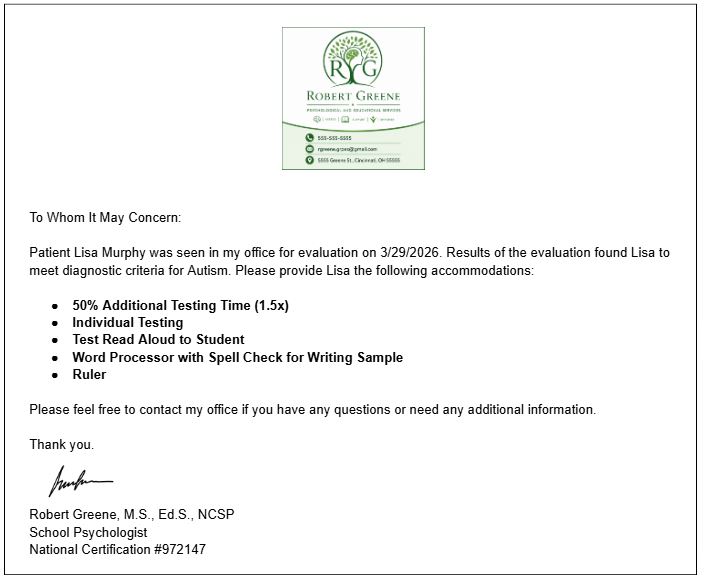
Example 1: Incomplete Documentation
- This example shows documentation with only a list of accommodations with no details of the student's functional limitation (disabilty) as it relates to the requested accommodations.
- While autism is noted as the disability, that is not enough to explain the student's functional limitation and understand what accommodations are reasonable for this student.
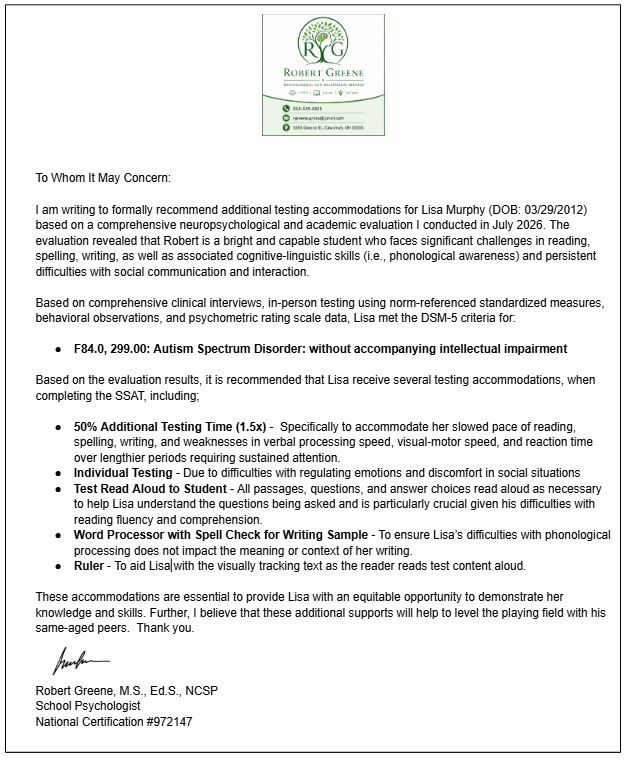
Example 2: Complete Documentation
- This example shows documentation that clarifies a student's functional limitation (disabilty) as it relates to each of the requested accommodations.
Common SSAT Accommodations
This section details the details, requirements, and restrictions related to commonly approved accommodations.
- Being sure you and your student understand this information before test day can significantly reduce stress.
- If your student requires an accommodation not commonly provided, use the "Other" section on the application to details accommodation requirements.
- Review the "Other" section below for additional details for "Other" accommodations.
- Students testing with 50% additional time will be provided at least a five (5) minute break between each section of any paper SSAT or computer Middle/Upper Level SSAT At Home administration. Any student completing a computer Middle/Upper Level SSAT with 50% additional time at a Prometric test center will be provided the same break structure as general test takers due to test software programming restrictions, but the breaks provided will also be extended by 50% additional time.
- Students testing with 50% additional time will automatically be placed in a small group setting of no more than ten (10) total students on test day.
- Any student completing a paper SSAT with 50% additional time in a small group setting will be required to use or wait out the full amount of time allotted for each test section before they will be permitted to move on to the next section, even if the student has completed a section or indicates their readiness to move on, to ensure all students have an equal opportunity to maximize the testing time for each section. Students taking a paper test in an individualized setting based on their approved accommodations will be permitted to move through testing at their own pace and may forgo any remaining time in a test section at their discretion. Middle and Upper Level test-takers sitting for either computer SSAT test option, whether at home or a Prometric Test Center, will also have the ability to choose to move on to the next section before the full time has elapsed for any test section or break time.
*Additional breaks between sections 1 & 2 and sections 3 & 4 of the SSAT will be provided ONLY to those students approved for any amount of additional time as a testing accommodation when completing a paper SSAT or SSAT at Home (Middle and Upper Level Only). Due to test programming differences between the computer and paper tests, students completing a Middle or Upper Level SSAT with 50% additional time at a Prometric test center will only receive breaks following the writing sample and Reading sections. Please review the computer-based testing schedule above for exact break timings.
**Due to time constraints, students completing the paper SSAT with additional time are NOT required to complete the experimental portion of the SSAT; however, any student completing the computer version of the Middle or Upper Level SSAT will be required to complete this section due to test design.
- Students approved for Answer Directly in Test Book are permitted to record their test answers directly in the test book rather than transferring answers to an answer booklet.
- Answers will be transferred to the answer booklet from the test book following completion of the test by either the test proctor or personnel from E3n.
- Transferred answers will be double-checked for accuracy by E3n personnel before the test is processed/scored.
- This accommodation will not be necessary for any student completing the computer-based version of the SSAT; however, if you anticipate having your student also complete a paper-based SSAT, it is best to apply and be approved for this accommodation as part of any application.
- A braille version of all test materials will be provided to the appropriate test center for your student’s use on test day.
- Any student in need of testing with Braille Materials will need to register for a paper-based SSAT test administration following accommodation approval. If you are not able to locate an available paper-based testing option in your area, please contact E3n directly at ta@enrollment.org for assistance in exploring available testing options.

- Students approved for the use of a four-function calculator are responsible for providing this piece of equipment on test day for any computer-based or paper-based SSAT administration.
- Students will be permitted to use this piece of equipment ONLY when completing the quantitative sections of the SSAT.
- The use of scientific calculators, calculator watches, or calculator applications on laptops or personal computers is strictly prohibited.
- Students must be approved for access to their diabetic supplies prior to registering for either the paper-based SSAT or the computer-based SSAT At-Home.
- This accommodation will not be necessary for any student completing a computer-based SSAT at Prometric, as Prometric test centers permit students to enter with any needed medical equipment on test day without prior approval; however, if you anticipate also completing a paper-based SSAT in the same test season, it is best to apply and be approved diabetic supplies as part of any application for accommodations as this approval will be required for access to these materials during any paper-based SSAT administration.
- Students approved for the use of diabetic supplies are permitted to bring any/all equipment/items necessary to monitor blood/sugar levels, administer prescription medication (i.e. insulin, glucagon), etc.
- Students with diabetic needs will be permitted to request up to one 20-minute break per test section during testing on test day. It is the student’s responsibility to request any needed breaks during testing. The student must raise their hand to get the attention of the proctor. The proctor will then stop the timing of the test to grant the break. Once the student is ready to settle back in to continue testing or whenever the full break time has elapsed, the test timing will restart and they will finish out the remainder of the section and move on per the standardized testing schedule. If your student has diabetic needs and you wish to have them complete the computer-based SSAT at Home, please be sure to contact E3n (ta@enrollment.org) before you register for any SSAT at Home test date to ensure your student is granted access to breaks, as needed, during testing.
- Students approved for diabetic supplies are required to test individually in their own room with their own proctor to ensure their needing to tend to their medical needs does not disrupt the testing of others on test day.
- If your student uses an SSAT-restricted item such as an cell phone or other electronic equipment with capabilities beyond those needed for medical purposes (e.g., iPhone with internet access), this specific equipment must be approved by E3n in advance of test day. Please contact us immediately to have your equipment approved to ensure your student has what they need during testing.
- Unauthorized use of any electronic equipment may result in the student being dismissed from the test with NO scores being reported and NO refund issued for the incomplete test.
- Students approved for the use of graph paper are responsible for providing this material on test day for any computer-based or paper-based SSAT administration.
- Three to six blank sheets of graph paper is recommended for testing and the student may access their graph paper throughout testing.
- All blank sheets of graph paper must be shown to the proctor before testing begins on test day.
- Students approved for the use of a handheld magnifier are responsible for providing this piece of equipment on test day for all computer-based and paper-based SSAT administrations.
- Students approved for use of a handheld magnifier are permitted to use this tool on all sections of the SSAT.
- Any electronic hand held magnifying device will need to be vetted by E3n to ensure the security of our test materials. This type of request should be entered as an "Other" accommodation.
- Students approved for the use of any type of hearing device(s) are responsible for providing this equipment on test day for all computer-based and paper-based SSAT administrations.
- Students are permitted to use their hearing aid(s) and/or devices throughout testing.
- Students may carry/hold extra batteries in the event one or both must be replaced during the test. Student MUST be able to replace batteries without assistance.
- Students registering to take the computer-based SSAT at a Prometric testing center are not required to have their hearing aids or alternate devices approved prior to testing.
- Students approved for the use of a highlighter are responsible for providing this writing tool on test day when completing paper-based SSAT administrations. Students may bring multiple colors.
- Students are not permitted to highlight the answer booklet, but may highlight any part of the test book.
- The computer-based SSAT at Home has a highlighting feature built into the test software to allow all students, including those without any approved accommodations, to highlight any text they wish when testing. To highlight, students must click and drag to select the text they wish to highlight. After selecting the text, a button labeled "highlight" will appear above the cursor allowing the student to select which color they want to highlight. All highlighted text will remain highlighted for the remaining time in a given test section.
- Please note that any student completing the SSAT at a Prometric test center will not have the same electronic highlighting functionality as permitted by the SSAT at Home. If a highlighting tool is necessary for your student on test day, it will be best to have them complete the SSAT using a different mode of testing.
- Students approved for the use of a large print test materials will have the modified test book provided to them on test day when completing a paper-based SSAT. All standard print test materials for paper-based testing are created using 11-point Adobe Caslon Pro, whereas the large print test materials are printed in 22-point Verdana.
- Any student approved for large print test materials who chooses to take any computer-based SSAT, at-home or Prometric, will have the ability to zoom in and out to adjust the size of the text presented on the screen, as needed, throughout testing.
- Large print test materials are provided by shipment, on an as-needed basis, to the test site where the approved student is registered. Please allow additional time (approximately 2 weeks) between registration and any scheduled FLEX test date to permit the necessary test materials to be shipped and delivered to the appropriate testing location.
Paper SSAT: Students approved for the use of a laptop for word processing their writing sample are responsible for providing this equipment on test day, as well as a USB flash drive or writable CD to store their written work for all paper-based SSAT administrations. Students must also be prepared to save and provide the finished writing sample by USB flash drive or CD. Printers are not available at paper-based testing centers.
- Any student sitting for a paper-based SSAT are permitted to use their laptop for ONLY the writing sample. All other sections are to be completed using paper/pencil.
- The use of Microsoft Word, Apple Pages, or any other basic word processor is strongly encouraged for all paper-based SSAT test takers to ensure the file submitted is accessible and able to be processed. It is recommended that the electronic file be saved as one of the following file types: .doc; .docx; .txt; .pages; or .pdf.
- Internet-based software programs that permit collaboration, such as Google Docs, are strictly prohibited on test day as part of any paper-based SSAT administration.
- Students are not required to disable their internet connection during testing; however, students are NOT permitted to access any type of internet browser or search engine, nor are they permitted to access any non-approved computer applications on test day. Any unauthorized use of a laptop/computer may result in a student’s dismissal from testing and their test being reported as an irregularity with no refund being provided for any invalidated test.
- Use of any grammar or spell checking functions built into the word processor is permitted as part of any paper-based SSAT administration. The use of specific software programs for grammar or predictive text such as Grammarly or Co-Writer, must be approved separately and are only permitted for use when completing paper-based testing at this time.
Computer SSAT at Home: Students approved for the use of a laptop when registering for any SSAT at Home administration will be afforded spell checking functionality when completing the writing sample portion of the SSAT. This functionality will underline any misspelled words found in your student’s written work, but will not offer predictive text or recommended corrections for the underlined misspellings. Therefore, if your student would like to do so, they may use an electronic spell-checking device during the written portion of the SSAT. The device will need to be shown to the virtual proctor during the initial check-in procedures on test day.
Computer SSAT at Prometric: Students will not be required to provide a laptop or data storage device if completing any computer-based SSAT at a Prometric Test Center; however, if any student approved for the use of a laptop would like to use an electronic spell checking device to assist them with composing their writing sample, they will be permitted to do so on test day as the computer-based testing platform is not built with this functionality.
The family will be responsible for providing an electronic spell checking device for their student should they decide to use one to support their writing on test day. Any device used by a test taker must meet the following criteria and be used in accordance with the guidelines outlined below
- Device is only to be permitted during the writing sample portion of the SSAT.
- Device must be manually operated and may not have speech-to-text capabilities or any other audio component.
- Device cannot have built-in calculation functionality and may not be used as the test taker’s calculator if also approved for such accommodation. If a test taker is approved for both a spell checking device and calculator, two separate devices are to be used.
- Device must be silent or have the ability to turn off sound when in use.
- Device cannot have a camera or the ability to scan/capture text.
- Device cannot have a data bank or data other storage functionality.
- Device cannot provide test taker with word definitions or thesaurus functionality (antonyms/synonyms).
- Device cannot be a cell phone.
- Device cannot require an internet connection for use.
- Device is only to be permitted during the writing sample portion of the SSAT.

- Students approved for the allowance of prescription medication(s) with water are permitted to keep their medication(s) with them at all times.
- The family is responsible for providing any necessary medications for their student on test day for all computer-based and paper-based SSAT administrations.
- Students may keep a bottle of water at or near their desk throughout testing.
- Prescription medication(s) MUST be contained in an original prescription bottle and MUST be prescribed to the student by name. No unmarked prescriptions will be permitted to enter the testing room.
- Medications MUST be self-administered as the test proctor will NOT be permitted to assist students in this way.
- All pill-based medications require approval as an accommodation prior to registering for testing. If you have questions regarding your medication, please contact E3n directly at ta@enrollment.org for assistance.
- Students approved to have a human reader assist them during testing are responsible for identifying and providing this individual on test day for any computer-based or paper-based SSAT administration. Eligibility requirements are in the last item of this section below.
- If your student has been approved to test with the assistance of a human reader AND you wish to have your student complete a computerized SSAT at a local Prometric test center, please be sure to contact Prometric directly following registration to learn more about their requirements and process in scheduling and setting up your student to test with their adult assistant.
- Students assisted by a reader MUST be tested individually to ensure the interactions between the student and reader do not disrupt the test taking of other students.
- For all paper-based SSAT administrations, readers will be provided their own test book on test day and are permitted to read ALL text which the student would be responsible for reading.
- All computer-based testing options will require the student and their reader to read from the same computer screen throughout testing.
- All text read aloud by the reader is at the complete discretion of the student; therefore, if desired, students may choose to read any section or subsection of the SSAT without assistance from their reader.
- If/when requested, the reader is permitted to read the test taker’s partial or completed writing sample aloud to them. The reader may only read this written work verbatim as it appears and may not provide any feedback related to the content of the written work.
- Readers MUST read all test material verbatim to maintain standardization and test validity and are NOT permitted to clarify, elaborate, or provide alternate descriptions, interpretations, or suggestions.
- All test related questions, including but not limited to requests for clarification, having directions repeated, etc., are to be posed directly to the proctor, not the reader. Please note that any student request to have a portion of the test re-read aloud by their reader does not require approval from the proctor and may be asked of the reader at any time during testing.
- Readers are NOT permitted to physically assist any student during testing, including, but not limited to: marking a student’s answers on the answer booklet, pointing in the student’s test book, etc. If a reader is unsure of how to respond to a request from the student, they should ask the proctor for clarification.
- If the test proctor determines the reader is providing a student with inappropriate assistance during testing, they reserve the right to provide a first verbal warning to the reader; however, if the proctor cites repeated instances of inappropriate assistance, testing may be discontinued and reported as a testing irregularity and the student’s test will NOT be scored.
- Students approved for the use of a ruler during testing are responsible for providing this item on test day for all computer-based and paper-based SSAT administrations.
- The ruler may be accessed/used by the student throughout testing, as needed.
- The ruler CANNOT exceed twelve (12) inches in length.
- Students approved for the use of a seat cushion or a pillow on test day are responsible for providing this item on test day for all computer-based and paper-based SSAT administrations.
- The cushion/pillow MUST fit reasonably on the seat and may be used throughout testing.
- Student will be placed in a testing room with no more than nine (9) other students testing with accommodations.
- Any student approved for testing accommodations is automatically placed in a small group testing environment, not to exceed ten (10) students, regardless of approval for the small group setting accommodation.
- Any student approved to test in a small group setting AND who registers to complete an SSAT at a local Prometric test center will automatically be scheduled to test individually in a separate room at Prometric. Each Prometric test center is set up differently, and this type of testing arrangement best helps to ensure a low-stimulus environment with minimal distractions and one that does not exceed an appropriate number of test-takers in the same room with your student during testing.
- Students approved to have a human scribe assist them during testing are responsible for identifying and providing this individual on test day for all computer-based and paper-based SSAT administrations. Eligibility requirements are in the last item of this section below.
- If your student has been approved to test with the assistance of a human scribe AND you wish to have your student complete a computerized SSAT at a local Prometric test center, please be sure to contact Prometric directly following registration to learn more about their requirements and process in scheduling and setting up your student to test with their adult assistant.
- Students assisted by a scribe MUST be tested individually to ensure the interactions between the student and scribe do not disrupt the test taking of other students.
- Scribes are permitted to transcribe all verbal information as dictated by the student when completing the writing sample section of the SSAT, and may, at the student’s discretion, fill in the answer booklet for all other sections of the test.
- Any verbal information dictated by the student as part of their written response MUST be transcribed verbatim and these individuals are NOT permitted to clarify, elaborate, or provide alternate descriptions, interpretations, or suggestions.
- All test related questions, including but not limited to requests for clarification, having directions repeated, etc., are to be posed directly to the proctor, not the scribe. Please note that any student requests to erase or make edits to their writing sample or answer selections do not require approval from the proctor and may be asked of the scribe by the student at any time during testing.
- If the test proctor determines the scribe is providing a student with inappropriate assistance during testing, they reserve the right to provide a first verbal warning to the scribe; however, if the proctor cites repeated instances of inappropriate assistance, testing may be discontinued and reported as a testing irregularity and the student’s test will NOT be scored.
- The scribe may word process the writing sample for the student only if the student has been approved for the use of a laptop for the written portion of the SSAT.
- Students approved to have a sign language interpreter assist them with the transmission and understanding of verbal test directions are responsible for providing this individual on test day for any computer-based or paper-based SSAT administration. Eligibility requirements are in the last item of this section below.
- If your student has been approved to test with the assistance of a sign language interpreter AND you wish to have your student complete a computerized SSAT at a local Prometric test center, please be sure to contact Prometric directly following registration to learn more about their requirements and process in scheduling and setting up your student to test with their adult assistant.
- Students assisted by a sign language interpreter MUST be tested individually to ensure the interactions between the student and the sign language interpreter do not disrupt the test taking of other students.
- If the student has a question for the test proctor, the sign language interpreter should relay the question to the proctor verbatim through spoken language, with the proctor’s response to the question being relayed to the student using sign language as similar to the spoken language as possible.
- Any student approved for the use of gel overlays when taking the SSAT is responsible for providing these materials on test day for all computer-based and paper-based SSAT administrations.
- For any computer-based SSAT administrations offered through Prometric, you will also need to provide a removable adhesive tape (i.e. painter’s tape) to affix the desired overlay to the computer monitor for testing.
- Gel overlays may be used on any portion of the SSAT requiring the student to read text.
E3n recognizes the uniqueness and individuality of each student’s disability and accommodation needs. All requests for “other” testing accommodations will be considered and reviewed on a case-by-case basis.
We may require additional time to work with testing locations to provide uncommon or “other” testing accommodations. E3n will work diligently to provide all such accommodations; however, certain requests may cause delays in testing so that we may procure the necessary facilities and staffing to meet your student’s testing needs.
On rare occasions, there may be "other" testing accommodations requested which are deemed unreasonable and cannot be provided. It is important to note that we cannot (and are not required by law to) provide any testing accommodation that will:
- jeopardize test security,
- fundamentally alter the SSAT, or
- cause an undue burden to E3n
In some cases, it may be necessary for E3n to work with the family to provide an equally effective testing accommodation in lieu of a requested accommodation. Recommendations for the use of an alternate testing accommodation will be made only when required to ensure the integrity and security of the SSAT are not compromised and when determined to be equally effective in meeting the student’s educational testing needs.
If approved, the details, requirements, and restrictions for an "Other" accommodation will be communicated to the family and the test center.
When approved for an "Other" accommodation, your admission ticket or testing details will simply list "Other." If you have questions or want to validate exactly what "Other" accomodations are included, email ta@enrollment.org.
- MUST be at least 18 years of age;
- CANNOT be a family member or guardian;
- CANNOT be any individual who has provided the student with direct SSAT preparation services, and;
- CANNOT be any individual who coaches or participates with the student in any athletic or extracurricular activity.
- If your student has been approved to test with any type of assistive personnel such as a reader or scribe, AND you wish to have your student complete a computerized SSAT at a local Prometric test center, please be sure to contact Prometric directly following registration to learn more about their requirements and process in scheduling and setting up your student to test with their adult assistant.
Nondisclosure Agreement: Individuals planning to serve as a student’s reader on test day will be required to sign a non-disclosure agreement (NDA) prior to the start of testing. The NDA is a legal agreement indicating that the adult assistant will not disclose or disseminate any exposed SSAT test content.
Approver Information for Families
An approver is a qualified individual who can affirm that valid documentation meeting our requirements is on file with their school or organization, and that the student is known to have a disability requiring testing accommodations.
The approver listed on a student’s application for accommodations is recommended to be a practitioner or representative from the student’s current or previous school (ex. school psychologist, special education coordinator, counselor, school administrator, therapist, learning specialist, teacher, etc.), but must be a professional that can attest to the student's disability and need for accommodations.
- The approver must be a non-family member, regardless of credentials possessed by a family member. Identified professionals must be able/willing to affirm that:
- The student is known to have a disability requiring accommodations for standardized testing.
- It may be necessary to identify a medical practitioner involved in your student’s diagnosis or ongoing treatment as the approver.
- Any individual approving accommodations for a student must be a non-family member, regardless of the credentials held by a family member.
If your student’s approver is unresponsive to your student’s request for testing accommodations, even after multiple contact attempts, you may choose to select a different approver to serve in this role for your student.
If you wish to change the approver associated with your student’s application for accommodations, you may do so within your parent/guardian online SSAT account by returning to the pending application for accommodations and clicking the “Change Approver” button. You will be asked to provide all contact information for the new approver before submitting.
If your student’s request for testing accommodations is denied by their designated approver, you may choose to:
- Submit a secondary application for the denied accommodations to the same qualified approver (in case of error with original submission).
- Indicate a different qualified approver who is willing to attest to the previously denied testing accommodations as being necessary and reasonable.
- Test with only the approved accommodations and forego those which were denied.
In the event your student’s requested accommodations are approved, but E3n determines that the supporting documentation provided does not substantiate the requested testing accommodations and/or meet E3n requirements, E3n will notify you of the decision and provide a rationale, including:
- An indication of which testing accommodations have been approved or denied.
- The aspects of the documentation and/or request that affected the decision.
- Clear suggestions and/or examples illustrating acceptable documentation.
- Instructions for submitting further documentation.
- Instructions for contacting E3n regarding any questions or concerns or to file an appeal.
Information for Approvers
Step-by-Step Guide for Approving Accommodations
Once you have been designated as an approver by a student, a few simple steps complete the process.
- First, you’ll receive an email with a link to an online form.
- Next, the Approver will request a security code via the link provided.
This code will be emailed and after entering the code, the form will be unlocked for completion.
Complete the online form, indicating:
- The type of documentation you have on file
- An approval or denial for each requested accommodation
- Your name
As part of the form, you’ll also be asked to print an Approver ID Form, sign it, and add a business card.
If you don’t have a business card, you can provide a brief statement on your company’s letterhead indicating your name, address, job title, responsibility for maintaining accommodation documentation, and that you are submitting the letter as verification of your identity for SSAT testing accommodations. f you will be submitting a letter to verify your identity as an SSAT approver of accommodations, please note that this letter should be submitted along with your signed approver identification form, not in lieu of this required document.
- To submit the ID form online, simply take a picture of the form and business card/letter with your smartphone and email to ta@enrollment.org.
- We will confirm when we’ve received and processed your ID form and your approval is complete.
If no other documentation needs to be submitted by the student, they will be alerted that they are approved and able to register with accommodations. Otherwise, if documentation is required, E3n will await its submission by the student for further review.
Once E3n has your ID on file, you will be considered a known approver.
This means that you will only need to submit ID once, regardless of the number of students you approve. Your status as a known approver continues through three testing seasons. In other words, if you become a known approver in the 2025-2026 testing season (August 1, 2025–July 31, 2026) you will not need to submit your ID again until August 1, 2028. When accessing future online approval forms as a known approver, the form recognizes your email address and will not require submission of identification for approval validation.
Documentation Requirements
Please see the documentation requirements listed for students above.
Medically-Based Testing Accommodations
- E3n recognizes the importance of permitting students access to necessary emergency medical equipment at all times. Students who require access to epi-pens and/or inhalers for emergency purposes during testing are not required to request access to these as an accommodation.
- The student must advise the proctor or test administrator they have an emergency inhaler or epi-pen.
- If the inhaler is regularly used as a medication and is not strictly for emergency purposes, it must be requested as an accommodation.
- If your student has a medication that must be administered during testing, select “Prescription Medication with Water” as an accommodation when applying.
- Students must be able to self-administer their medication.
- Medications must be contained in an original prescription bottle with the student’s name printed on the label.
- If your student has a medical device that must be used during testing, enter it under an “other” accommodation.
- Students must be able to use any medical devices themselves.
- Students are responsible for providing all necessary medical items/equipment on test day. If you have concerns regarding your student’s ability to test on a specified test date due to health concerns or if you are unsure whether you need to apply for testing accommodations for your student, please contact us at ta@enrollment.org as soon as possible.
- Any student with medically-based testing accommodation needs may be required to test individually with their own test proctor, depending upon the nature of the medical condition or impairment and the likelihood that the student may distract or negatively affect other students in the testing environment.
Religious Considerations
All students will be recorded when completing the SSAT At Home. Recordings will be kept for up to one year for review, as needed. If you object to the photo/video requirements as set forth by E3n due to any religious beliefs or affiliations, please compose a letter citing such concerns and email the letter as an attachment to E3n at ta@enrollment.org. An E3n staff member will be in touch to discuss the matter and explore test options in your area.
Any student may wear a head covering for legitimate religious reasons when completing the SSAT without pre-approval from E3n. During the test day check-in process, SSAT administrative staff may confirm and review with the student and/or their parent(s) that the head covering is being worn for religious purposes. It is permissible for SSAT administrative staff to ask for the student to show their religious head covering by turning their head left and right, notably for the SSAT at Home. At no time will a student be asked to remove a head covering indicated to be worn for religious purposes. Head coverings and hats that are not worn due to religious affiliation/beliefs are prohibited.
Sunday testing notes:
- This process is only for being approved to take a Standard test (paper) on a Sunday.
- NO approval is necessary for non-Saturday testing for:
- SSAT at Home
- Prometric
- Paper Flex test
- The availability of Sunday Standard testing is very limited. For most families, other test modes, like those listed above offer the best flexibility.
- If you are having difficulty locating a Sunday testing site near you, please email ta@enrollment.org as soon as possible so that we may help you identify a test site that can meet your testing needs within a reasonable distance.
- If your student is in need of Sunday testing approval for any SSAT test date offered in Israel, please contact E3n at ta@enrollment.org for assistance.
- The approval for Sunday testing accommodations is valid for the current testing year in which it was approved (August 3 through July 20), plus one more testing year.
Sunday Testing Application Process
1. Log in to your student’s account, click the “SSAT Testing” button and then the “Apply for / View My Accommodations” tab.
2. Next, click the “Click to Apply for Sunday Testing” button to be taken to the online application.
3. Provide contact information for an approver who is able to attest that:
- Your student cannot test on a Saturday due to religious reasons (i.e. a member of the clergy, rabbi, etc.).
- Upload documentation from a religious leader who attests to your need to test on a day other than Saturday.
Additional Information
Any student utilizing a non-approved accommodation(s) on test day will be cited for an irregularity. Irregularities are fully investigated and invalid tests will NOT be scored. Additionally, no refunds are provided for a student caused irregularity.
If you or your student has a physical disability and you need to confirm physical access to the testing location (ramps, elevators, accessible parking, etc.), you do not need to request testing accommodations (i.e. use of a wheelchair, use of elevator, etc.). Instead, please email ta@enrollment.org so that E3n can ensure your access to the testing location.
If your student has a temporary impairment, such as a broken arm, and you have concerns regarding their ability to complete testing, please email ta@enrollment.org before requesting accommodations or registering for a test.
In general, it is E3n's recommendation that such students should postpone testing until after they are recovered to ensure test performance is an accurate reflection of their true abilities.
Testing accommodations for completing the SSAT are reserved only for those students with an identified or suspected disability or impairment that is expected to have an adverse impact on test performance. As a result, any student currently receiving educational testing accommodations as a result of Limited English Proficiency (LEP) as an English Language Learner (ELL) who does not also require accommodation(s) due to a disability or impairment, is not eligible to receive accommodations when completing the SSAT.
If you did not request a particular accommodation with your student’s original application and you would like to have additional accommodations considered/approved, please email ta@enrollment.org for assistance.
- It may or may not be possible for additional testing accommodations to be added/approved for your student without the need to submit an additional application or documentation.
- Depending upon factors specific to the situation, including the test date, the test mode, your student’s needs, and the additional accommodations requested, it may be necessary to reschedule testing. Please contact E3n as soon as possible by emailing ta@enrollment.org.
Questions?

If you have any questions or concerns about your family's ability to provide anything needed for your student to complete testing, please contact E3n immediately and well in advance of your scheduled test date.

